Homepage Overview
After logging into the system, regular users can intuitively see the Quick Start, personal usage details, and resource quotas on the homepage, as shown in the figure below:
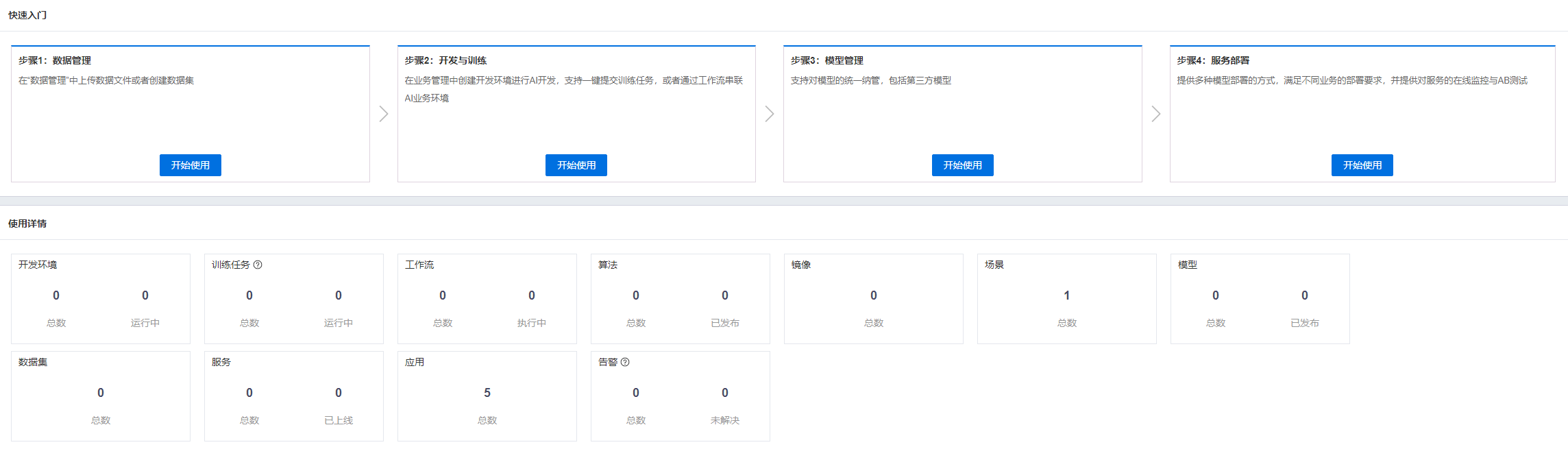
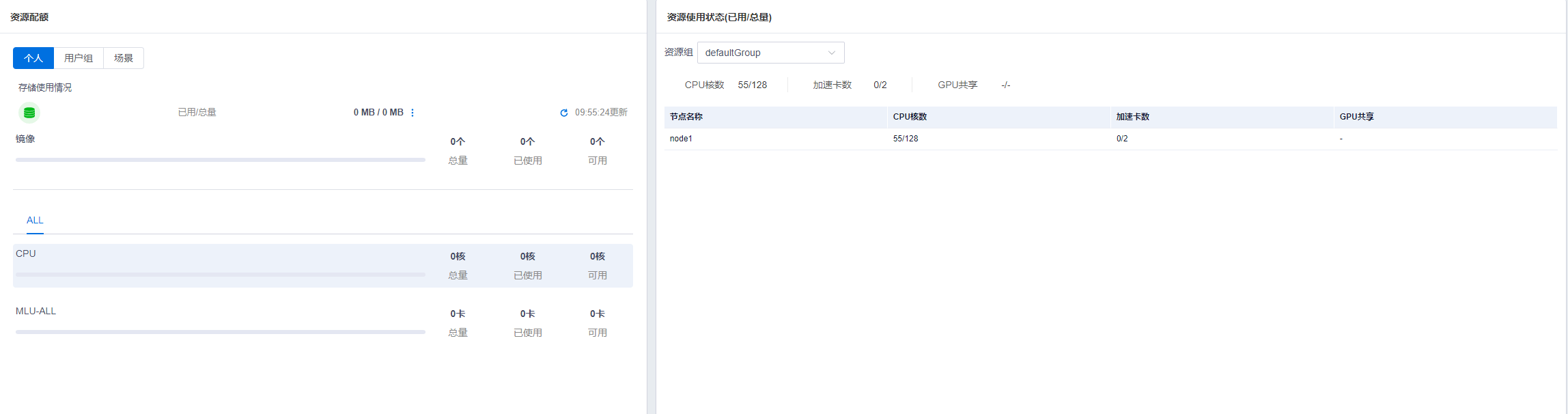
The specific information included in the above figure is detailed below:
Quick Start
Quick Start for platform business usage, allowing access to relevant business features via shortcuts.
Usage Details
Usage Details mainly include the following content:
| Name | Description | Business Scope |
|---|---|---|
| Development Environment | Total number of personal items in the development environment, number running | Training + Inference, Training |
| Training Job | Total number of all undeleted personal jobs in Job Management (Job Management + Terminated Jobs), number running | Training + Inference, Training |
| Workflow | Total number of personal workflows in Workflow Management, number executing | Training + Inference, Training |
| Algorithm | Total number of personal algorithms in Algorithm Management, number published | Training + Inference, Training |
| Container Image | Total number of personal container images | Training + Inference, Training |
| Scenario | Total number of scenarios bound to the user in Scenario Management | Training + Inference, Inference |
| Dataset | Total number of personal datasets in Dataset Management | Training + Inference, Training |
| Model | Total number of personal models and published models in Model Management | Training + Inference, Training |
| Alerts | Total number of unresolved alerts across the cluster in the last six months | Training + Inference, Training, Inference |
| Services | Total number of services and online services for general models, application deployments, native deployments, and HELM deployments in Model Services (Ready status for general models, application deployments, and native deployments; Running status for HELM deployments) | Training + Inference, Inference |
| Applications | Total number of personal applications | Training + Inference, Inference |
Resource Quotas
Displays data such as personal resource quotas, group resource quotas for the user's group, and scenario-based resource quotas.
Personal Resource Details
"Home > Resource Quotas > Personal"; available when the business scope is Training + Inference or Training
Displays the current user's personal resource usage, including disk quotas and resource quotas (managed by resource group, resource series, and resource type). Resource quotas, such as CPU and GPU, can be filtered by the configured resource group dimension. Quotas include:
| Name | Description |
|---|---|
| GPU-ALL Usage | Total (resource size allocated upon user creation, can be set to unlimited), Used (sum of GPUs used by non-stopped development environments + training jobs in Queuing (non-Queuing), Data Pulling, Image Pulling, or Running states), Available (Total - Used); MIG instances are counted as whole cards |
| MLU-ALL Usage | Total (resource size allocated upon user creation, can be set to unlimited), Used (sum of MLUs used by non-stopped development environments + training jobs in Queuing (non-Queuing), Data Pulling, Image Pulling, or Running states), Available (Total - Used) |
| Usage of Other Accelerator Types | Total (resource size allocated upon user creation, can be set to unlimited), Used (sum of other accelerator types used by non-stopped development environments + training jobs in Queuing (non-Queuing), Data Pulling, Image Pulling, or Running states), Available (Total - Used) |
| CPU Usage | Total (resource size allocated upon user creation, can be set to unlimited), Used (sum of CPUs used by non-stopped development environments + training jobs in Queuing (non-Queuing), Data Pulling, Image Pulling, or Running states), Available (Total - Used) |
| Disk Usage | Total (resource size allocated upon user creation, can be set to unlimited), Used (actual space used by the current user's directory on nodes), Available (Total - Used) |
Disk usage includes details for each storage. Disk usage supports manual refresh and displays the disk update time. Manual refresh only counts usage in the user's home directory, excluding group-shared and global-shared user storage.
Note:
- The second 'ALL' in GPU-ALL refers to the accelerator type dimension, which may be GPU-Tesla-P100-PCIE-16GB. When Total is unlimited, Available is also unlimited. When Used exceeds Total, Available displays as 0, and a quota exceeded alert pops up after page initialization. If there are no MLU nodes in the cluster, MLU usage will not be displayed. If there are no other accelerator type nodes in the cluster, the count for other accelerator types will not be displayed.
- Training jobs in the description include all task types in "Task Management".
User Group Resource Details
Displays resource usage for the current user's group, divided into Training and Inference, including:
User Group Training Quota
"Home > Resource Quotas > User Group > Training Resources"; available when the business scope is Training + Inference or Training
| Name | Description |
|---|---|
| Disk | Used (sum of home directories, group-shared, and global-shared usage for all users in the current user's group), Total (resource size allocated by the administrator when creating the user group, can be set to unlimited) |
| CPU Cores | Used (sum of CPUs used by non-stopped development environments + training jobs in Queuing (non-Queuing), Data Pulling, Image Pulling, or Running states for all users in the current user's group), Total (CPU core size allocated by the administrator when creating the user group, can be set to unlimited) |
| GPU Cards | Used (sum of GPUs used by non-stopped development environments + training jobs in Queuing (non-Queuing), Data Pulling, Image Pulling, or Running states for all users in the current user's group), Total (GPU card size allocated by the administrator when creating the user group, can be set to unlimited); MIG instances are counted as whole cards |
| MLU Cards | Used (sum of MLUs used by non-stopped development environments + training jobs in Queuing (non-Queuing), Data Pulling, Image Pulling, or Running states for all users in the current user's group), Total (MLU card size allocated by the administrator when creating the user group, can be set to unlimited) |
| Number of other accelerator types | Used (sum of other accelerator types used by development environments in the current user group that are not stopped, and training jobs in Queuing (non-Queuing), Data Pulling, Image Pulling, or Running states); Total (size of other accelerator types allocated by the administrator when creating the user group, can be configured as unlimited) |
Disk usage includes details of each storage usage.
Note:
- If there are no MLU nodes in the cluster, the number of MLUs will not be displayed; if there are no nodes with other types of accelerators in the cluster, the number of other accelerator types will not be displayed.
- Training jobs in the description include all task types in "Task Management".
User Group Inference Quota
Home > Resource Quotas > User Groups > Inference Resources, available under the business scope of Training & Inference, Inference
| Name | Description |
|---|---|
| Memory | Used, Total (memory size allocated by the administrator when creating the user group, cannot be configured as unlimited) |
| Storage Class XXX | Used, Total (storage class size allocated by the administrator when creating the user group, cannot be configured as unlimited) |
| CPU Cores | Used, Total (number of CPU cores allocated by the administrator when creating the user group, cannot be configured as unlimited) |
| Number of NVIDIA-AXX-PCIE-40GB cards | Used, Total (accelerator card size allocated by the administrator when creating the user group, cannot be configured as unlimited) |
Scenario Resource Details
Home > Resource Quotas > Scenarios, available under the business scope of Training & Inference, Inference
Displays the usage of scenario resources bound to the current user, including:
| Name | Description |
|---|---|
| Memory | Used, Total (memory size allocated by the administrator when creating the scenario, cannot be configured as unlimited) |
| Storage Class XXX | Used, Total (storage class size allocated by the administrator when creating the scenario, cannot be configured as unlimited) |
| Number of CPU cores | Used, Total (number of CPU cores allocated by the administrator when creating the scenario, cannot be configured as unlimited) |
| Number of NVIDIA-AXX-PCIE-40GB cards | Used, Total (accelerator card size allocated by the administrator when creating the scenario, cannot be configured as unlimited) |
Resource Usage Status (Used/Total)
"Home > Resource Quotas > Personal", available under the business scope of Training & Inference, Training, Inference
Displays the resource usage of the resource group to which the current user belongs and the nodes within the resource group, including:
Resource Group Usage
| Name | Description |
|---|---|
| CPU Cores | Used (actual number of CPU cores used under the current resource group, including component usage); Total (actual number of CPU cores on all nodes under the current resource group) |
| Number of Accelerators | Used (actual number of accelerators used under the current resource group, counted only once if the same card is used by multiple tasks, used will not exceed total); Total (actual number of accelerators on all nodes under the current resource group); MIG instances are counted as whole cards |
| GPU Sharing - Multiplexing Rate | Used (number of GPU shares used by all tasks under the current resource group); Total (number of GPU multiplexes under this resource group), displays "-" if not shared |
| GPU Sharing - VRAM Isolation | Used (GPU VRAM size used by all tasks under the current resource group); Total (GPU VRAM multiplex size under this resource group) |
| GPU MIG | (Number of GPUs used by all tasks under the current resource group according to MIG specifications); Total (number of GPUs under this resource group according to MIG specifications) |
Note: Shared mode includes GPU multiplexing rate, GPU VRAM isolation, and GPU MIG.
Node Usage
| Name | Description |
|---|---|
| Node Name | Names of nodes included in the resource group to which the current user belongs |
| CPU Cores | Used (actual number of CPUs used under the current node, including resources used by node components, rounded up, cannot exceed total); Total (total number of CPU cores under this node) |
| Number of Accelerators | Used (actual number of accelerators used under the current node, counted only once if the same card is used by multiple tasks, used will not exceed total); Total (actual number of accelerators under this node); MIG instances are counted as whole cards |
| GPU Sharing - Multiplexing Rate | Used (number of GPU shares used by all tasks under the current node); Total (number of GPU multiplexes under this node), displays "-" if not shared |
| GPU Sharing - VRAM Isolation | Used (GPU VRAM size used by all tasks under the current node); Total (GPU VRAM multiplex size under this node) |
| GPU MIG | Used (number of GPUs used by all tasks under the current node according to MIG specifications); Total (number of GPUs under this node according to MIG specifications) |
Note: Shared mode includes GPU multiplexing rate, GPU VRAM isolation, and GPU MIG.