Monitoring and Alerts
Alert List
The Alert List module provides functions to display (record, statistics) and operate on alert information generated after configured alert items trigger alert conditions. Regular users log in to the platform, select "Alert Management > Alert List" to enter the "Alert List" page.
-
You can view the alert information list, which includes: node name, alert name, alert type (alert, recovery), alert level (general alert, severe alert), alert content, alert resource, handling status (pending claim, processing, resolved, ignored), alert time, recipient type (role, user), recipient, and alert metric trend.
-
Supports querying data based on the following conditions:
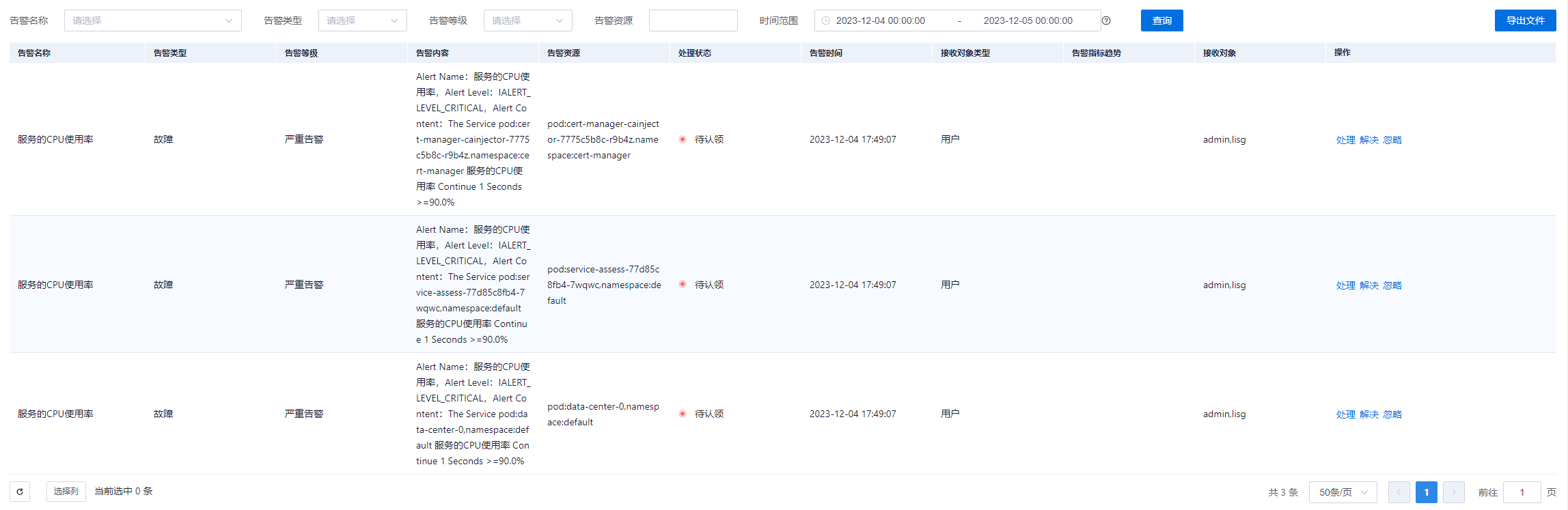
|Name |Description |
| ---- | ---- |
|Alert Name|The dropdown list displays alert names for exact query by alert name. |
|Alert Type|Dropdown exact query (alert, recovery). |
|Alert Level|Dropdown exact query (general alert, severe alert). |
|Alert Resource|Fuzzy query. |
|Time Range|(Precise to the second) Default query time is the last 10 minutes; page refresh rate is 10s. Custom query time ranges are supported (greater than or equal to start time, less than end time); the page does not auto-refresh.|| -
Use the "Export File" button in the upper right corner to export queried alert information from the page to an Excel file.